

Description
Download Vernier Instrumental Analysis™ – Chemistry, Lab, Science, Education, Instrumentation
Overview
The Vernier Instrumental Analysis™ app is a free desktop and mobile software solution designed to support science education, particularly in chemistry classrooms. It enables students and educators to collect, analyze, and share data from a range of laboratory instruments, including the Mini GC™, Mini GC Plus, Go Direct® Mini GC, Go Direct Polarimeter, and Go Direct Cyclic Voltammetry System. The app’s primary purpose is to simplify the integration of advanced instrumentation into high school and undergraduate chemistry curricula, allowing learners to engage with real-world analytical techniques without requiring extensive technical setup.
By providing a guided, user-friendly interface, the software helps students navigate the data-collection process step by step, reducing the learning curve associated with complex lab equipment. It supports real-time data visualization and analysis, making it ideal for lab experiments involving gas chromatography, polarimetry, and electrochemical analysis. The app is especially beneficial for educators seeking to modernize their lab instruction with accessible, instrument-based learning tools. Its cross-platform availability ensures broad accessibility across various school and home computing environments.
Key Features & Capabilities
- Instrument Integration: Seamlessly connects with Vernier’s Mini GC, Mini GC Plus, Go Direct Mini GC, Go Direct Polarimeter, and Go Direct Cyclic Voltammetry System for real-time data acquisition.
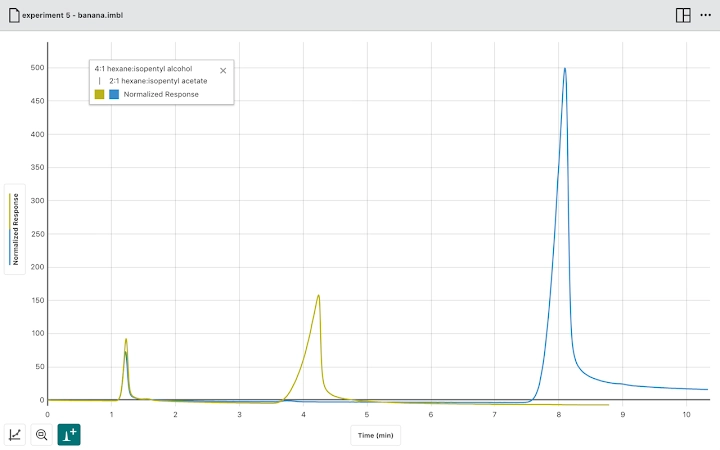
- Gas Chromatography Support: Allows students to collect gas chromatograms and perform peak integration, enabling analysis of component separation and quantification.
- Polarimetry Analysis: Facilitates the collection of optical rotation data and polarimetry scans, supporting experiments such as mutarotation kinetics of sucrose.
- Cyclic Voltammetry Tools: Enables the recording of voltammograms and the identification of current peaks to determine standard potentials in electrochemical reactions.
- Multi-Platform Compatibility: Available on Windows, macOS, iOS, iPadOS, Android, and Chrome OS, ensuring accessibility across diverse educational settings.
- Data Sharing & Collaboration: Supports exporting and sharing collected data, fostering collaboration between students and instructors.
These features empower students to conduct hands-on experiments that mirror professional lab practices. For example, a chemistry class can use the app to analyze the composition of a mixture using gas chromatography, or study the time-dependent optical rotation of a sugar solution. The integration of analysis tools directly within the app reduces the need for additional software, streamlining the entire experimental workflow.
User Interface, Workflow & Performance
The user interface of Vernier Instrumental Analysis™ is designed with educational usability in mind, emphasizing clarity and intuitive navigation. The app guides users through each stage of the data-collection process with visual prompts and step-by-step instructions, minimizing the potential for user error. The layout is organized into logical sections—device connection, data acquisition, real-time graphing, and analysis tools—ensuring a smooth workflow from setup to results.
Navigation is straightforward, with clearly labeled buttons and menus that remain consistent across supported platforms. The app’s performance appears stable during typical educational use, with minimal lag during data streaming and graph updates. The developer did not specify resource usage details, but general software behavior suggests efficient operation on modern systems. No reported instability or crashes were noted in publicly available documentation. The app maintains responsiveness even when handling multiple data streams, which is essential for complex experiments involving time-series measurements.
Compatibility & System Requirements
Vernier Instrumental Analysis™ is compatible with a wide range of operating systems, including Windows, macOS, iOS, iPadOS, Android, and Chrome OS. The software is available as a free download with a file size of 200 MB. This makes it accessible to schools and students using various devices, from desktops and laptops to tablets and Chromebooks.
Exact system requirements were not listed. However, the app’s compatibility with both mobile and desktop platforms suggests it is optimized for low-to-mid-range hardware typically found in educational institutions. The developer did not provide additional system requirements, so users are advised to ensure their devices meet the minimum specifications of their respective operating systems. Installation is straightforward and does not require administrative privileges on most platforms.
Pros and Cons
Pros
- Free to download and use, making it accessible for schools with limited budgets.
- Supports multiple advanced lab instruments, enhancing curriculum flexibility.
- Intuitive interface designed specifically for students and educators.
- Real-time data visualization and analysis tools improve learning outcomes.
- Available across six major platforms, ensuring broad device compatibility.
Cons
- Requires specific Vernier hardware to function, limiting standalone use.
- Exact system requirements were not provided, which may affect installation on older devices.
- Functionality is restricted to Vernier’s instrument ecosystem, reducing versatility.
- May require additional training for educators unfamiliar with the hardware.
FAQ Section
Is Vernier Instrumental Analysis™ compatible with all lab equipment?
The app is designed to work exclusively with Vernier’s Mini GC, Mini GC Plus, Go Direct Mini GC, Go Direct Polarimeter, and Go Direct Cyclic Voltammetry System. It does not support third-party instruments.
Can I use the app without a physical device?
No. The software requires a compatible Vernier instrument to collect and analyze data. It cannot function as a standalone simulation tool.
Is the app safe to download and install?
Yes. The app is developed by Vernier Software & Technology, a trusted provider of educational science tools. It is distributed through official channels and does not contain malware or intrusive behavior.
How often are updates released?
Updates are released periodically to improve compatibility, fix bugs, and add support for new instruments. Users are encouraged to keep the app up to date for optimal performance.
Can I use the app offline?
Yes. Once installed, the app can be used offline to collect and analyze data from connected instruments. However, software updates and cloud-based features may require an internet connection.
Final Thoughts + CTA
Vernier Instrumental Analysis™ stands out as a powerful, free tool that brings professional-grade instrumentation into educational settings. Its seamless integration with key chemistry lab devices, combined with an intuitive interface, makes it an ideal choice for science educators aiming to enhance hands-on learning. While its functionality is tied to specific hardware, the app delivers strong value for schools investing in Vernier’s ecosystem. The broad platform support ensures that students can engage with advanced scientific methods regardless of their device type.
For chemistry teachers and lab coordinators seeking to modernize their curriculum with real data collection and analysis, this app is a must-have. It bridges the gap between theory and practice, empowering students to explore complex concepts through experimentation.
Download Vernier Instrumental Analysis™ now
Guides & Tutorials for Vernier Instrumental Analysis App for Chrome
How to install Vernier Instrumental Analysis App for Chrome
- Click the Preview / Download button above.
- Once redirected, accept the terms and click Install.
- Wait for the Vernier Instrumental Analysis App for Chrome download to finish on your device.
How to use Vernier Instrumental Analysis App for Chrome
This software is primarily used for its core features described above. Open the app after installation to explore its capabilities.
User Reviews for Vernier Instrumental Analysis App for Chrome 0
No reviews found





